05:54
VOCABULARY FREELANCE Explanation of the terms and abbreviations used on freelance sites.
Please note ? although some of these terms are quite self-explanatory for English speaking freelancers, they can be misinterpreted or hard to understand for people from other countries.
Abbreviations of the freelance site names:
- SL - - ScriptLance
- GAF - - GetAFreelancer
- RAC - - RentACoder
- GAC - - GetACoder
- JL - - JoomLancers
- freelancer : a self-employed provider
- outsourcing : the delegation of the work or the part of the work, to an external resource (for example freelancers). With a growing popularity of this phenomenon, there emerged the freelance markets which provide the platform for contacting buyers with sellers
- buyer, webmaster : both terms are used to describe a client
- seller, provider : a person to do the contracted work (sometimes freelance sites use different terms ? like coder, programmer)
- auction, project : an auction where a freelancer places his offer (bid)
- bid : freelancer?s offer placed for a project (usually includes the price and description)
- auto-bidder : freelancer, who puts ?blind? offers for multiple projects, usually even without reading the project description; the sort of provider avoided by more experienced buyers
- invite-only : project open for invited providers only (to whom the buyer has sent his invites)
- confirmation : acceptance of the selection for a project (required by some freelance boards)
- featured : ?special? project ? the buyer has paid for its better exposure; quite often it?s a long-term contract (such projects cannot be posted as the common ones)
- review : feedback given after the finished project; usually rating in 1-10 scale
- escrow : deposit; seller places the price to be paid for a project in Escrow and waits for the work to be done; after that, he releases the deposited money and they are transferred into provider?s account
- withdraw (al) : transferring the money from the account on the freelance site to the personal one (done using a cheque, wire-transfer, PayPal, etc.)
- wire transfer : money transfer between 2 bank accounts
- invoice : some freelance sites provide the feature of invoicing
- mockup : a sketch or partial demonstration of the idea of finsihing the project; very often used to gain client?s attention before the project is awarded
- rate (hourly) : the rate you declare to work for (estimate or average)
- cancel : cancelling, terminating the project (from various reasons)
- PM/PMB : private (or personal) message; private message board is used for direct communication with a buyer without it being seen by other providers
- deadline : declared and agreed date of finishing the work on the project
- supspend(ed) : freelancer?s account can be suspended in case of breaking the site TOS (Terms Of Service)
- ASAP : as soon as possible; urgent project
- FL : freelancing
- NDA : Non Disclosure Agreement
Site Reviews Freelance Job Project for IT
 Established services, with a long online presence, trustworthy and proved to do a good job. Finding the work with their assistance is safe.
Here you will find more detailed descriptions of a few freelance marketplaces, along with the list of their advantages and disadvantages.
These informations should help you in making the decision of which site to use.
1. GetAfreelancer

GetAFreelancer.com helps webmasters, web designers, programmers, software developers and business owners to develop their projects. Our escrow feature is developed to protect both buyers and sellers. Our site is global and we have freelancers from India, Romania, Russia, Ukraine, United States, UK and many other parts of the world. We have thousands of satisfied clients around the world. If you never tried to contract work to another part of the world you have your chance today. Sign up free! We provide a safe escrow environment and you don?t release the money until project is completed.
GetAFreelancer is a great site and it?s expanding very quickly. In a very short time it has grown into a well known freelance marketplace and together with SLRAC they form the ?Big Three?. Over 300 projects posted daily.

Fees and comissions:
- Project award comission: 10% of bid amount (minimum $5)
- Project award comission for Golden Members: none
- Featured project award comission: none
- Golden Membership charge: $12/month
- Golden Membership one-time research fee: none
Withdrawal methods:
- - PayPal ($1.00 fee)
- - E-Gold (5.00% fee)
- - bank wire
- - check
- - Moneybookers ($0.75 fee)
- - Western Union ($18.00 fixed and 8.00% fee is taken)
Advantages:
- - number of the projects (over 200 projects posted daily!) and their variety
- - reasonable fees and comissions
- - interface and functions (for example - one account for both provider and buyer)
- - refundable project posting fee (verifies the reliability of a buyer)
- - monthly bid limit, eliminating mass bidding on the projects (auto-bidding)
- - several withdrawal methods (cheque, PayPal, e-gold, wire transfer, Western Union, Moneybookers)
- - very good and quickly acting support
- - very attractive ?Golden Membership? program
- - fast withdrawal processing
Disadvantages:
- - no obligatory deposit
- - project budget ranges
2. ScriptLance

The site provides a service that helps businesses find freelance programmers and designers for their projects. What began in early 2001 as a way to satisfy the custom programming demands at Smarter Scripts, has now become one of the Internet?s most popular freelance programming sites. ScriptLance has helped thousands stay under budget and helped many become more financially independent.

Fees and comissions:
- - Signup bonus: $1
- - Project award comission: 5% of bid amount (minimum $5)
- - Project award comission for Certified Programmers: 2.5%
- - Featured project award comission: 1% of bid amount
- - Certified Programmer charge: $25/month
- - Certified Programmer one-time research fee: $10
Withdrawal methods:
- - Paypal (no fee)
- - E-Gold (2% fee)
- - check - regular mail ($3 fee)
- - check - FedEx Overnight ($38 fee)
- - bank wire ($25 fee)
Advantages:
- - number of the projects (over 150 posted daily) and their variety
- - reasonable fees and comissions
- - interface and functions (invited only projects, featured, job listings)
- - several withdrawal methods (cheque, PayPal, e-gold, wire transfer)
- - quick withdrawals (up to a few days maximum)
- - own dedicated forum and support
Disadvantages:
- - no obligatory deposit
- - occasional problems with support
3. RentACoder

Rent A Coder is an international marketplace where people who need custom software developed can find coders in a safe and business-friendly environment. Buyers can cherry pick from a pool of over 145,000 coders enabling them to hire a coder across the country or across the globe? from the comfort of their computers. Buyers who wish to hire internationally, can take advantage of favorable overseas exchange rates, resulting in work being done for 50-90% less than if the project were done in-country. Coders are also given access to a huge pool of potential work and have the ability to work independently from their homes rather than for a company.

RentACoder is a site different than SL and GAF and for a beginner it may be harder to use. But due to its unique features it?s highly recommended after getting some more experience in freelancing.
Fees and comissions:
- - Open Auction project comission: 15% of bid amount (minimum $3)
- - One-on-One project comission: 12.5% of bid amount (minimum $3)
- - Bonus / Direct Payment comission: 10% of bid amount (minimum $3)
- - Bulletin board project comission: none
Withdrawal methods:
- - PayPal
- - mail check (United States: $5, Non-United States: $10)
- - Western Union (US: variable Western Union fee + $5, Non-US: variable Western Union fee + $10)
Advantages:
- - number of the projects and their variety
- - obligatory deposit (Escrow)
- - slightly higher average prices
- - interface and functions (arbitrage system, better ranking system, conversation between buyer and seller is recorded)
- - very good and quickly working support
- - pre-moderated projects
- - ?Top Coder? ranking giving the additional exposure to your bid
Disadvantages:
- - higher fees deducted from payment
- - few withdrawal methods (cheque, PayPal, Western Union)
- - withdrawals processed only twice a month (around the half and the end of the month)
- - occasional problems with database and other temporary system issues
4. Joomlancers

If you require professional Joomla/Mambo website design or development for your business, whether its a long-term job or just a single project, you will find the help you need here at the prices you want to pay. No matter how big or small your budget is, Joomla freelancers from around the world will compete for your business at JoomLancers.
That?s it! Your project is then closed, your are put in contact with the chosen freelancer who will begin working, you can leave a review, and pay them when you are ready to pay them. Our fee: only $5, which is deducted from your JoomLancers account only after your project closes. We even give you 30 days time to pay that fee! Why? Because we are confident you will be satisfied with the service JoomLancers provides.
It?s like getting an estimate from dozens of qualified professionals and then choosing the one you like most. You save time because you don?t need to shop around, and you save money because programmers/designer are competing for your business! JoomLancers is the number one choice for thousands of freelancers and businesses when it comes to Joomla/Mambo programming and design projects.

Site dedicated for projects related to Mambo and Joomla, but other project categories are also posted there: design, graphics, programming, translation, etc. Just a few projects are posted daily (around 10), but the budget of each of them is really interesting.
Another great thing about JoomLancers is that the number of buyers is higher than the number of providers - which is unusual for a freelance market. This shows high interest in Joomla and Mambo related projects and means that there will be more and more work coming this way.
Fees and comissions:
- - Project award comission: 10% of bid amount (minimum $5)
- - Project award comission for Golden Members: none
- - Featured project award comission: none
- - Golden Membership charge: $8-$10/month (depends on the plan selected)
- - Golden Membership one-time research fee: none
Withdrawal methods:
- - PayPal (free)
- - wire transfer ($35.00)
Advantages:
- - reasonable fees (10%, min. $5)
- - easier competition (less providers)
- - precise and well working rating system
- - attractive "Gold Membership? program
Disadvantages:
- - number of projects (ca. 10-15 projects posted daily)
- - smaller popularity
- - few withdrawal methods (PayPal, wire transfer)
5. GetACoder

GetACoder is a leading Global Services Marketplace doing business in more than 200 countries. Our unique system accelerates your time to market and provides your business with key competitive advantages. When you use GetACoder you are stretching your budget and saving as much as 60% over traditional outsourcing. GetACoder is changing business, now it?s no longer about what you own or build but which resources and talent you can access.

Site similar to ScriptLance/GetAFreelancer ? with a similar interface and offered features. Compared to the ?Big Three? (GAF, SL, RAC), there are less projects posted. Also their variety isn?t that rich ? the webdesign and programming ones are strongly dominating.

Fees and comissions:
- - Project award comission: 10% of bid amount + $5
- - Project award comission for Premium Members: 10% of bid amount
- - Premium Member charge: $7.95/month
- - Premium Member one-time research fee: none
Withdrawal methods:
- - PayPal (free)
- - E-Gold (5.9% + $0.45 fee)
Advantages:
- - number of projects
- - easier competition (less providers)
- - one account for both provider and buyer
- - attractive ?Premium Membership? program
Disadvantages:
- - smaller popularity
- - higher fees applied when a project is won
- - few withdrawal methods (PayPal, e-gold)
05:47
ScriptLance
One of the best sites, both for people just starting in freelancing and for those more experienced.

The site provides a service that helps businesses find freelance programmers and designers for their projects. What began in early 2001 as a way to satisfy the custom programming demands at Smarter Scripts, has now become one of the Internet?s most popular freelance programming sites. ScriptLance has helped thousands stay under budget and helped many become more financially independent.

Fees and comissions:
- Signup bonus: $1
- Project award comission: 5% of bid amount (minimum $5)
- Project award comission for Certified Programmers: 2.5%
- Featured project award comission: 1% of bid amount
- Certified Programmer charge: $25/month
- Certified Programmer one-time research fee: $10
Withdrawal methods:
- Paypal (no fee)
- E-Gold (2% fee)
- check - regular mail ($3 fee)
- check - FedEx Overnight ($38 fee)
- bank wire ($25 fee)
Advantages:
- number of the projects (over 150 posted daily) and their variety
- reasonable fees and comissions
- interface and functions (invited only projects, featured, job listings)
- several withdrawal methods (cheque, PayPal, e-gold, wire transfer)
- quick withdrawals (up to a few days maximum)
- own dedicated forum and support
Disadvantages:
- no obligatory deposit
- occasional problems with support
Quick Start
A short, illustrated guide showing you how to start working on one of the popular freelance sites ? starting from signing up and ending with the withdrawal of the earned money.this site will be used as an example illustrating each step. The whole process is very similar for the other sites (especially for those based on a similar script ? GAF, GAC), so it should be easy after following the walk-through with ScriptLance as an example.
Registration (signing up)
After clicking on the ScriptLance banner above, you will be taken to the SL?s home page. To sign up as a freelancer (provider), click the ?Programmers? image (see the screenshot below).

Then ?sign up? at the bottom of the page
 Click image to enlarge
Enter email address. This address will be used to communicate with the site, so it has to be a valid one. You will receive an e-mail containing the link which will allow finishing the registration process.
 Click image to enlarge
Clicking the link in the just received e-mail, you?ll be taken to the your profile page.
Fill in the following fields :
- Nickname you?ll use for this site and the name of the company.
- Your qualifications (designing, programming, etc.)
- Average hourly rate and short description of the company and services you are providing
- You can upload your logo and check if you want to be informed about the new projects matching your qualifications (as listed in your user profile). It?s a good idea to turn this feature on.
 Click image to enlarge
After finishing setting-up your profile, you?ll see the information confirming your newly created account, the username and password. Don?t reveal this password to anyone.
 Click image to enlarge
Congratulations! You?ve just registered your account and can start your work as a freelancer.
Project
After setting up the account you can take part in an auction or even in a few ones. On the main page you?ll find the list of 10 recent projects (marked with (1) on the screenshot) and 10 Featured projects (marked with (2)).
To see the list of all the projects, click ?View All? (3).
 Click image to enlarge
Once you see the interesting project, click on its name and enter the project auction page, with the project description (1) and providers? offers (2). You can place your bid (4) or send a Private Message (PM) to a buyer using PMB (3).
 Click image to enlarge
Placing your offer ? bidding on the project. Declare the price you are ready to make the work for and the time needed for it (1), and put a comment describing your offer (2). You have also the possibility of selecting the option of being notified if someone place the offer lower than yours (3). You will see a confirmation of placing the bid on this project.
 Click image to enlarge
The details of the project can be discussed using the Project Message Board (PMB). You?ll see the list of the private messages sent by other providers (1) and you can send your own message by clicking ?Post Reply? (2).
WARNING! You can?t post any form of contact (e-mail, IM, etc.) ? it is possible only in case of the Featured projects.
 Click image to enlarge
To send a Private/Personal Message (PM), write it in the message field (1), you can also send the message to everyone ? then the ?Private Post? (2) field should be left empty. By default there is a webmaster?s nickname written in it.
 Click image to enlarge
A short explanation of one of the most important pages ? account management panel. You can see:
- the most recent financial transactions (transfers, fees, withdrawals) with the option of displaying the full list (1)
- projects you have bidded on (with a possibility of withdrawing the bid from active projects and the option of displaying the full bidding history) (2)
- projects won and writing a review for the webmaster (and a list of all the won projects) (3)
- financial transactions including money withdrawal (4)
If you have convinced the buyer and he selects your offer, you?ll receive the e-mail informing about it
Additionally this e-mail will contain a link to the page where you can accept the selection (you have to confirm your acceptance of the work on this project). You also have the possibility of accepting or denying the selection on your account management screen (2).
 Click image to enlarge
Congratulations ? you have won a project!
Now the work on it starts, then ? there?s handing the finished work and finally ? the payment for the work done (using the Escrow deposit is highly recommended).
After finishing the work and receiving the payment, both sides should write the reviews. It?s the common practice that it is a buyer to be the first to write a review, then a provider does it.
You write a review using the account management page ? next to the list of won projects, there are nicknames of the webmasters. Clicking on the right nick, you?ll enter the page, where you can rank this webmaster and write the review for the project you have just finished.
 Click image to enlarge
Money withdrawal
You can request the withdrawal using one of the methods available ? cheque, PayPal, e-gold or wire transfer. Each method has its own fee for the processing.
Enter the amount you want to withdraw (1) and select the method of withdrawal (2).
 Click image to enlarge
Depending on the method selected, fill-in the forms and?
 Click image to enlarge
? wait until the money arrives.
Recommended another sites freelance job project IT
LOOK SITE REVIEW FREELANCE IT
05:46
GETAFREELANCER GUIDE
GetAFreelancer is a great site and it?s expanding very quickly. In a very short time it has grown into a well known freelance marketplace and together with SLRAC they form the ?Big Three?. Over 300 projects posted daily
GetAFreelancer.com helps webmasters, web designers, programmers, software developers, Copywriting, Graphic Design and Translator to get job projects. Alot project can you found in here, after you finish project you will be pay. We have thousands of satisfied clients around the world. If you never tried to contract work to another part of the world you have your chance today. Sign up free!
The goal of GAF is to be a meeting place for serious business people. As a buyer, you have a project you need done that will help you or your business grow and prosper. The sellers on this site are here because they too are trying to make a decent living. They?re willing to provide the services that buyers need, and all they ask in return is to be paid a fair amount for their time and skills.
GAF was not designed to be a discount super center specializing in providing top-notch skills at rock-bottom prices. For this business to grow and attract high-quality buyers and sellers, every attempt must be made to use standard business practices and pricing when creating and bidding on projects.


Diagram Flow Getafreelance Work
You can receive a lot of value from your association with the professionals who sell their services here at GAF. All you have to do is treat them like you want to be treated yourself.
A short, illustrated guide showing you how to start working on one of the popular freelance sites and get project IT.
Registration (signing up)

After clicking on the Getafreelancer banner above, you will be taken to the GAF's home page. To sign up as a freelancer (provider), click the "sign-up" (see red arrow the screenshot below).
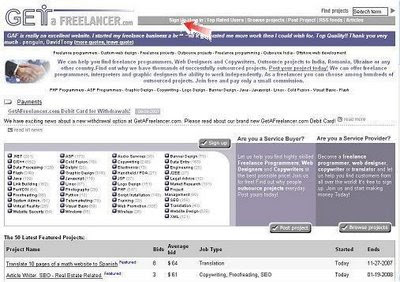
Complete form register. Enter your username (1) and email address (2). This address will be used to communicate with the site, so it has to be a valid one. You will receive an e-mail containing the link which will allow finishing the registration process. then Select "i agree to term and condition" to agree (3). If you want become a gold member, select box. If not, do not select (4). Then click "next" to step 2

In step 2 you must enter code verification (1). check you email. you will receive e-mail from getafreelancer. open email from GAF and copy code from that email. Then click next step 3

In step 3. Setting-up your profile. Complete you profile, because from profile is buyer project knows your ability and trusting your to work project

The Last step, check you email. you will receive email from getafreelancer to activation you account and Congratulations! You've just registered your account and can start your work as a freelancer.
GET YOUR JOB PROJECT IT
 After setting up the account you can take part in an auction or even in a few ones. To get project you must active browse project. On the main page you?ll find the list of projects and make bid project then you must active make communication with buyer project (PMB buyer), ask detail project and convince buyer if you can up to project on time.
Step By Step to Get Project
After complete registration. open Getafreelancer
First you login in your account. click menu login (1) then enter you username and you password (2).

After login. In you account, you can see "main menu" (1)
- Edit account info : in this menu you can change you profile. You profile is very important to trust buyer project. so complete you profile
- Provider activity : this menu to use check following project, you won project and make communication with you buyer project
- Buyer activity : this menu use if you reserve project. You can check your project and make communication with your provider project.

To find project click menu "browse project" (1) and will be show list project (2 & 3), or you can browse project in this site.

Once you see the interesting project, click on its name and enter the project auction page, with the project description and providers? offers (1). If you want follow project. You can place your bid (3) or send a Private Message (PM) to a buyer using PMB (2). You can see competitor (4) and they bid, so you must convince reserve project if you are is the best and you can finish they project on time.

After you click "Bid on this project", will be show form bidding condition. with budget buyer project (1). so place you bid appropriate with the budget (2). and you must finish that project on time (3).

 The details of the project can be discussed using the Project Message Board (PMB). You?ll see the list of the private messages sent by other providers and you can send your own message by clicking ?Post Reply? .
WARNING! You can?t post any form of contact (e-mail, IM, etc.) ? it is possible only in case of the Featured projects.
Now the work on it starts, then ? there?s handing the finished work and finally ? the payment for the work done (using the Escrow deposit is highly recommended).
After finishing the work and receiving the payment, both sides should write the reviews. It?s the common practice that it is a buyer to be the first to write a review, then a provider does it.
TIPS :
Every month you will get 15 chance to bid project (for free member). So use all you chance for won project. Never dare to try.
Honestly, it?s really difficult to get your first job. Let?s talk about the first site. You will see many projects, listed every where. Don?t be worried; just register on this site. REMEMBER to fill your profile well enough, because people will see your profile before they give any work to you. Online jobs are not that easy to get
How can you get a project for high rates when there are many other people applying for the same project and they have great ratings too, where you don?t even have one rating. So, go for the lowest price. After you place a bid, you go back to the project description page and look for a small icon called PM (Private Message). PM is the key factor in success of Online Jobs.
Now click on it, and send a message to the creator of the project and tell him that you are new but you can do an excellent job for him and that you will do it for the lowest price that he wants to pay for the project. After you send the PM, wait for the reply, if there is a reply then (bingo), there is a good chance of wining that project. Your Online Jobs career will start when you win your first project.
Open the PM box to see what the buyer replied and act accordingly. Few things to Remember: First of all, you can place bids on 15 projects in the first websites mentioned above, in contrast to the second website where you can place bids on as many projects as you like to. In first website, if you become a gold member, you can then place bids on 160+ projects, which means that you can do many Online Jobs. I prefer you upgrade to gold member as soon as you earn $12.
Here are few advantages of gold membership. There will be no extra fees. For example if you win a project worth of $100 and you are a gold member, then you will get the whole $100 after you complete the project. But if you are not a gold member, then you have to pay a fee (5%). It costs $12 per month to become a Gold member. I suggest you first find work on this site, then when you earn a little money, you then pay $12 and become a Gold member.
ALWAYS, remember to send a PM to the creator of the project after you place a bid there. As I said before, PM is the most important factor in success of online jobs, so always remember to send PM.
The 2 Biggest Freelancer Mistake is:
"No Communication" and "No Bids Actions"
05:37
 Some people are just freelancers at heart. They enjoy the freedom of choosing what they'll work on, the variety of work, the opportunity to work with different people, often the chance to work at home, and many other benefits. But there's the good with the bad, and often that includes dry spells mixed in with being overworked.
Here are some tips for maximizing your freelance income, whether it's for blogging services, copywriting, design, SEO or something else. The bulk of these tips are gathered from my own experience as a long-time freelancer, but the references are skewed towards some of my favorite freelance and blogging-related blogs, as well as a few of my own posts on various blogs.
1. Don't accept all work.
If you're not going to enjoy it, or the project rate is high but the equivalent hourly rate is low, then think twice before accepting. Also, some clients just require too much of your time for too little return. (I.e., remember the Pareto Principle.)
2. Leverage your research time.
If you work in a certain niche, without conflict for multiple clients, you can often research for mutliple projects at once. For example, if you're writing feature articles on the same topic for two or more clients, you might be able to research online for them simultaneously. Assuming you are paid by the article/ project, they will hardly care that you got work done faster.
3. Recycle your efforts.
If you've collected enough notes sufficient for several articles on a topic, or sketched multiple designs for several logos, or whatever, recycle that effort. Can you produce several distinct works that could be sold to anyone besides the client in question? Or can you give these away on your blog? That in it itself would display your abilities and potentially draw future clients, for just a bit more effort.
4. Have multiple income streams.
Building multiple income streams can go hand in hand with recycling your efforts, or it could refer to having other means of revenue that do not take you away from your main business.
5. Learn proper multi-tasking.
A lot of bloggers are slamming multi-tasking, but it's worked for me for a long time. You just have to multitask properly and apply it where it can be applied (non-physical work). It's especially useful if you're juggling multiple projects. Multi-tasking is efficient handling of simultaneous tasks, not tasks done at the same time. There's a huge difference.
6. Get in the flow.
Multi-tasking is all well and good, but when you actually work on a client's project, be dedicated - get in the flow.
7. Use efficient bookkeeping.
Keep receipts for everything relating to your work, no matter how frivolous. It just may be tax-deductible. This is especially important if you have a clearly delinated home office area. You can write off some expense based on ratio of office space to home.
8. Don't undersell yourself.
Set rates based on a simple formula:
* Rate = $D/ B hrs.
* D is the desired salary per year that you want.
* B is the total number of billable hours that you think you can secure in a given year. Most consultants/ freelancers estimate B on the basis of 15 billable days per month, for an 8-hour day. So that's 15 d/mth x 8 hr/d x 12 mth/yr = 1440 hrs/yr. The rest of each month will usually be spent doing administrative work, seeking out new clients, improving skills, researching, or possibly vacationing. Don't forget to factor in vacation time, any professional costs such as subscriptions, your operating costs, etc.
Once you have that hourly rate, translate that in to flat project rates, when necessary. You'll eventually get a sense for how long a particular task takes, but you might take in less than you want when you first start out.
9. Track your time.
Keep track of your hours spent, even on a project for which you quoted a flat project rate. This will help ensure you are not charging too little or taking too long on some tasks. This will also help if you outsource any work. You'll learn how long a task should take, plus a buffer for someone with less experience. Consider time and task management tools, or a web-based spreadsheet such as Zoho Sheet or Google Spreadsheets so that you can share information with hires.
10. Consider work insurance.
This goes by different names but is essentially liability insurance for freelancers and contract consultants. Some clients in certain industries (e.g., software development) will not sign with you without liability insurance. While this doesn't technically save you money, in given industries it increases your chances of getting high paid work.
11. Value your time.
It's one thing to track your time, but if you're wasting part of your day's productive periods not working, then you're effectively reducing potential income. This applies whether you're working at home or in an office. Learn to get the most of your work day, and learn your productive times.
12. Catalog ideas.
Record any ideas for future work as you have them, even if you can't get to them immediately. I like to use mind mapping software if I need to show hierarchy of ideas and outlines. Other times, I just make a flat list. When I find a lull in my schedule, I explore these ideas. Often, I'll find that when someone asks me to do some work, knowing my areas of interest, I'll have something relevant already scoped out. Thus, some of my legwork is already done, and someone is offering to pay me to complete it.
13. Blog.
if you're not already a blogger, no matter what service you freelance, establishing a blog and writing quality content (tutorials, resource lists, reviews, essays) will help promote and establish your authority and eventually bring work. That, of course, depends on what you're writing about. Your blog's topics should be closely related to the services you offer. Just make sure that you are drawing in potential clients, not just random readers. You can track general visitor behavior to your blog with Performancing's own PMetrics and the new plugin.
14. Network.
If you do good work, it's likely that you might start getting more work than you can handle. You can turn it down or pass it on to a colleague. No doubt they or another colleague will do the same for you. Or pay it forward. So network online and make sure you're networking on purpose.
15. Delegate.
Alternately, you can build your business. One drawback with freelancing is that there are only so many hours in the day and week. There's a limit to how many new clients you can take on. However, if you've learned some project management skills and can motivate and manage a small team, you can delegate tasks to people still learning the ropes. This of course changes you from being a lone freelancer to essentially being a consulting firm. You do the billing, allowing room for a reasonable wage/ rate for team members, and a management fee for yourself - since you have expenses and are ultimately responsible for the work.
16. Partner up.
Partnerships with other freelancer offering complementary services allows you to jointly offer packages. If you're working online, this might include a partnership amongst designers, writers, SEOs, SMMs, marketers, and analysts (web analytics). This allows you to work with Fortune 500 companies, who often prefer to work with a full-service firm. Make sure that someone interfaces with each partner to make the services cohesive.
17. Be professional.
While the way you look isn't as much of an issue if you're working online, generally being professional goes a long way to impressing clients. Meet deadlines, make clients happy.
18. Be timely with invoices.
If you don't send out invoices on a timely basis, it's unlikely you'll be paid for work on a timely basis. Do yourself a favor and try out a good web-based invoicing tool, some of which send auto reminders and even accept payment online. Either that or use PayPal and request a fraction (25-50%) of the fee upfront, before work begins.
19. Invest.
If you do have great clients who pay up early, put some money into a safe investment, such as a federally-insured online savings account or a short-term government bond. Do this especially with money you've set aside for income taxes, if you are not required to make such payments on a quarterly basis.
20. Know your tools.
There are tons of web-based freelance tools out there, many of them available free of charge or for a small monthly fee. They might not only save you money but often increase work efficiency as well, leaving you more time for more billable work. Or relaxation. What's more, some of them allow real-time collaboration with partners, teammates, and/or clients.
21. Know your resources.
There are numerous sites popping up that list freelance gigs. You might not always need them, but it's good to know they're available. A lull in your work schedule might be filled with a short-term gig.
22. Get repeat business.
Repeat business from existing clients is more valuable and less stressful. They are a known parameter, and there is less effort on your part in securing even more work later on.
23. Get referral business.
Your current happy clients are often more than willing to give referrals, especially if you offer a referral bonus. Just watch out for the lies told to freelancers.
24. Draw positive attention.
There are positive ways to draw attention to yourself or your website that pay off in the long-run - either through establishing authority or straight out requests for your services. My favorite examples are Seth Godin with his free, oddly-named, informative ebooks, and Hugh MacLeod with his savagely funny Gaping Void cartoons, also available free through a blog widget.
25. Stay healthy.
It should go without saying, but many of us freelancers run ourselves ragged. We don't take breaks to recharge ourselves, to relieve ourselves of stress. And you already know that stress brings illness, which reduces billable time. Of course, you can do research or admin work when you're ill.
22:53

Web sitelerinde bulunan flash animasyonlar? �alabilen ve bunlar? fla uzant?s?na �evirebilen harika bir program. Web tasar?mc?lar?n olmazsa olmaz?d?r. Serial mevcuttur.
Boyut: 3,08 MB

22:52

Kolay kullan?m? ile birka� dakikada de?i?ik font ve efektleri kullanarak e?lenceli ve profesyonel animasyonlar haz?rlay?p sitenize ekleyebilirsiniz. Birbirinden g�zel yaz?, font, slite, ve daha bir�ok efekt bar?nd?ran bu program bir harika. Patch mevcuttur.
Boyut: 42,1 MB
22:51

2 ve 3 boyutlu, g�r�nt� kalitesi y�ksek, estetik butonlar olu?turmak i�in kullan?lacak kolay bir program. Haz?r taslaklar? d�zenleyebilir, kendi taslaklar?n?z? olu?turabilir, bunlar? proje halinde veya JPEG, BMP, PNG, G?F, ?CO ve TGA formatlar?nda kay?t edebilirsiniz. Patch mevcuttur.
Boyut: 1,31 MB